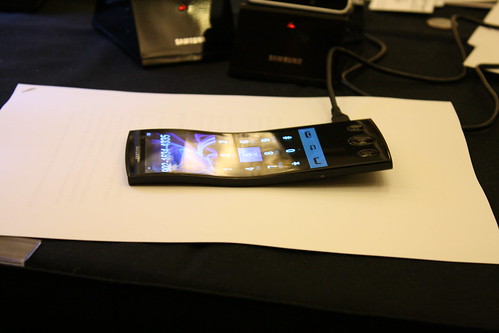
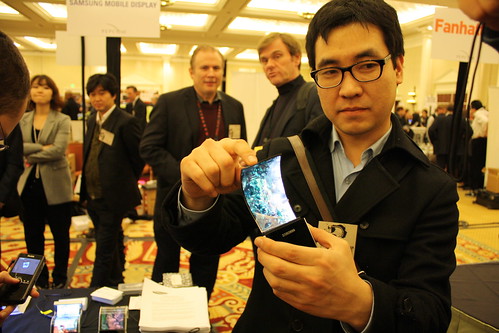
chek this Samsung galaxy s i9000 mini....so exiting...

Tuesday, June 14, 2011

The Honeycomb 3D

XDA DEVELOPERS CREATE A AWESOME THEME FOR SMART PHONES & TABLETS.


Description:
A fully colored, "eye candy" style Honeycomb theme for all Android/cm7 devices with the new Theme Chooser application. This theme is based off bypass's aosp 3.0 ROM port and hax's "templatebread" with every stock gingerbread menu/settings/widget/app/status bar icon replaced with high-resolution 3D images from Honeycomb, Sense, MIUI, UOT, XDA and Google. 


3 versions now on the market:
-
Blue 3D icons: https://market.android.com/details?i...e.theme.hc3d3d
-
3D icons w/ mock soft buttons: https://market.android.com/details?id=com.mike.hc3dsb
-
Tablet version: market link 


ABOUT CREATOR ;


I have spent hundreds of hours throughout the last few months perfecting this theme and its still far from being finished, but I've recently started working with zexcrazy (the creator of "Animated Eye Candy") who has done a ton of work helping me recompile the theme, fix the xml/.9 pngs, and optimize the files for mdpi; bkmo who has been compiling everything on linux and creating the new dialer, lockscreen, thin blue volume sliders, call screen and zipthemer addons; jjhiza who is creating the mock Honeycomb widgets, dock icons and homescreen layout; and nbeebe24 who got the xml files working for 1% battery increments. Without the incredible amount of free time these guys have dedicated to help me out, this theme wouldnt be anywhere near the level its currently at. I would also like to thank the entire Yoshi team who has been helping out by testing beta releases and giving advice when I get stuck, and haxzamatic for providing the template and guides for the new theme engine 

If you like our work all I ask is you hit the "thanks" button after downloading and don't forget zexcrazy, bkmo, jjhiza, nbeebe, haxzamatic, shiwantha, yoshi, and bypass/nforce/google for the honeycomb port (where I got most of the images from). Send me a pm if you want to be added to the list or join the project on github, I'm welcome to anybody who wants to help the team make new additions or improvements  And feedback is definitely appreciated because I know not everyone has the time (or desire) to figure out the theme engine. But even one icon or suggestion could make a huge difference so feel free to send ideas my way  


[B]Screenshots:
         
Tablet version:

Installation:
*Read carefully*

1.download latest theme apk from the market:
-Blue 3D icons: https://market.android.com/details?i...e.theme.hc3d3d
-3D icons w/ mock soft buttons: https://market.android.com/details?id=com.mike.hc3dsb
-Tablet version: market link
(Will install as separate versions)
-More colors coming soon 

2. Open theme Chooser app and apply honeycomb 3D. The theme engine might say there's assets missing for your device but its lying. Hit that "apply anyways" button with your middle finger 

*If the theme isn't showing up at all, your rom most likely came with the latest version of the theme Chooser app preinstalled and its has been having issues, so try scrolling between the themes slowly with your trackball and if that doesnt work, or if your rom didnt include the theme chooser app, here is a link for the apk that can be installed using any app installer: http://dl.dropbox.com/u/22147062/ThemeChooser.apk ***

4. Reboot and start looking through your new mini-tablet 

5. Don't forget the hc3D extras zip and bkmo's new zipthemer/metamorph lockscreen, volume sliders, and themed reboot popups for mdpi! (see links below)

Instructions for addons:
Here's the zip file that includes all latest bkmods, jjhiza's widgets+dock icons, several new honeycomb wallpapers, all stock HC/3.0 app icons (for ppl who like those better than the blue tinted ones in the theme), the 3.0 music player port, maxthon (which is very similar to 3.0's browser), a honeycomb bootanimation, bootanimationutility.apk (for easily switching to new bootanimations), and a battery calibration app that I strongly suggest you install if experiencing any battery drain issues (completely unrelated to the theme but its a small apk so it doesn't really hurt) 

1. Download the following file and extract its contents to your SD card or computer:http://dl.dropbox.com/u/22147062/hc3D%20Extras2.zip (5/18 update: latest zipthemer morphs; added more wallpapers, widgets, and icons)

*The current hc3D addons zip is about 13mb whereas bk's zip is only .5mb, so if space is an issue you can download bk's latest zipthemer/metamorph zip separately here:http://dl.dropbox.com/u/22147062/hc3d-mdpi-morph-26.zip
http://dl.dropbox.com/u/22147062/HC3...i-morph-21.zip
and you can find the rest separately on xda or send me a pm  *

2.For bk's themed lockscreen, reboot popup, and volume sliders download one of the two above links, and apply only the files in HC3D-lckmorph-mdpi-26/hdpi-21.zip to your rom framework by using zipthemer or metamorph. If you have never done this before or need instructions, see this post by Dont Panic: http://forum.xda-developers.com/show...64&postcount=3

3. (ADW, LP, GO launcher): Long-press each of your dock icons and press edit, then select your desired app shortcut/action and icon from the gallery.

4. For jjhiza's widgets/icons you will need to use the "desktop visualizer" app temporarily while we are working on incorporating them into the theme. Separate DL zip:http://dl.dropbox.com/u/22147062/JJH%20HC%20Layout.zip
For detailed instructions and original files see this thread by jjhiza: http://forum.xda-developers.com/show...6#post13248666

5. Honeycomb wallpapers can be applied from homescreen *located in gallery (wallpapers folder) after unzipping hc3Dextras2 file*

6. Install the Google 3.0 music player apk with any app installer

7.BootAnimation.apk and BatteryCalibration.apk can also be installed using app installer if you want or need them  Do not unzip the bootanimation, just use that app tool or swap using root explorer.

8. Some nice transparent and blue market, gmail, facebook apks thread can be found here:http://forum.xda-developers.com/showthread.php?t=877510

To do List:
-Optimize for HDPI
-Add remaining menu popup icons
-improve 3.0 UI
-add rest of themed apps/widgets
-Touch-up images
-add honeycomb keyboard layout
-

Its still a work in progress but more is being added on a daily basis, and again, please feel free to make suggestions (especially now while we're still adding icons). V3 will be done in a few weeks with full colored menu icons as well as a blue version (and maybe other colors when the theme is complete) for those who like the current blue icons like I do  And if you want to make modifications, send me a pm and Ill see about adding them to the theme or OP! I am also currently looking for more devs with experience in xml or the theme engine to incorporate some bigger changes, so if you have time and are interested in joining the team let me know!

__________________
Phone: Mytouch3G v1.2 OC614/245
Rom: 2.3.4 Ginger Yoshi 1.1 (ext4, ADW, no swap)
Theme: Honeycomb 3D
Kernel: farmatito 2.6.35.13
radio: 2.22.28.25
spl: 1.33.0013d S-ON
Recovery: ClockworkMod 2.5.0.7
SD: Kingston 16gb class 4, SanDisk 8gb class 2

Samsung Galaxy S3 With A Cylindrical Amoled Display


OLED-display.net and Oled.at are one of the leading portals for information on future Organic Light Emitting Diode display and lighting technology.
Samsung Mobile Display want to produce cylindrical Amoled displays for smartphones in 2012.
At the FPD-2010 and CES-2011 Samsung Mobile Display show us a 4.5 inch flexible high resolution AMOLED Display.
Samsung Mobile Display want to ramp up a full production line of this flexible displays in 2012. The goal is to introduce a cylindrical smartphone with an AMOLED display in 2012. SMD can produce a flexible Amoled with WVGA resolution 800x480 pixel with 2 cm diameter on a plastic substrate for that goal. Samsung Mobile display don´t use a glass substrat they use a special plastic material to reach the high resolution and the bending property. Samsung mobile Display develop a special production method with 350-400 Celsius to reach the goal.

Source: www.OLED-display.net 

Saturday, June 11, 2011

Android 2.3.4 Hits Galaxy S GT-I9000 !!......enjoy.....

Today is the day that Samsung released Android 2.3.4 for their former flagship Galaxy S GT-I9000.


THANK YOU SAMFIRMWARE..


Build date is June the 3rd.
More information:
PDA:   XXJVP
Modem:   XXJVP
CSC:   Multi
The link is in our Download area 
And follow our instructions !

this what you have todo

Welcome.
Please remember that flashing your mobile phone is fully on your own risk.
If the process is interupted (power failure, disconnected cable, software failure (e.g. with KIES) ) your phone might be very dificult to revive.

this firmware only for SAMSUNG GALAXY S I9000.
I ATTACHED 3 FILES HERE  SO FIRST DOWNLOAD THIS GUIDE FIRST, 


download the flash program.u have to flash your mobile through this program.

and finally you download the firmware (2.3.4)

lets enjoy..............................................


The latest Gingerbread update, Android 2.3.4, as a treat for fans of Google Voice. Users can now use the Voice Chat app to make video calls. And not only to Android devices but also to Google Talk users on PC andMac. And unlike Facetime, the app can use 3G and 4G networks rather than just Wi-Fi.
To make a call, users just go to the Google Talk app and press the video chat icon next to a contact’s name. In addition to making video calls, users can also send text messages that are incorporated into the video screen. Users can also continue the call, audio only, while using another application. The feature is currently running on Nexus S phones, with more Android Handset coming in the near future.
Wow. It’s yet another category that the bot is passing Apple by with. When first introduced the FaceTime feature on the iPhone 4, it was a fresh new feature, but it could only work on WiFi. Now, with applications like Google Talk, Skype, and Qik offering video chat not only over WiFi, but via 3G and 4G networks with Android, video chat is becoming a competitive feature set. The real question though is, with data caps in place by all wireless providers, how often will it be used?
The folks over at SamFirmware.com have gotten their hands on the official build of Gingerbread 2.3.4 for the Samsung’s GT-i9000, better known as the Galaxy S. While users of the European model of the Galaxy S have been rockin’ Gingerbread since mid April, this update brings a couple handy new features to the latest major release of Android (for phones at least). So why should you update? Well we’d be happy to tell you…
First let’s clear up that this is only for the GT-i9000, meaning the European version of the Galaxy S. This is not meant for, or tested for any of the American variants, and we can’t say that it won’t brick your phone if you try using it. If you DO have the original, non-carrier branded Galaxy S then this update brings all the joys of 2.3.4. Of course Google’s most publicized feature in this update was the addition of voice and video chat to Google Talk. Another cool feature is compatibility with the Open Accessory APIs. This might not matter to many people, but if you’re a techie who loves Arduino, then this opens all sorts of cool possibilities for you to play with.
The less exciting, but no less important aspect of the 2.3.4 upgrade is the security fix it brings. If you remember back in May, there was talk of a security flaw in Android which could be exploited to steal info when authenticating over wireless networks. While Google says they rolled out a global fix for this to android phones, the fix was built in to 2.3.4, giving you a little extra piece of mind.
So if GTalk video chat is too much to pass up, you’d like the extra piece of mind (mind you the security patch should have already rolled out to your phone by now), or you’re just feeling adventurous, SamFirmware has the download for the European Galaxy S.


Tuesday, June 7, 2011

Sony Ericsson XPERIA Arc Combines Design and Technology


Xperia Arc is Sony Ericsson’s best smartphone for the time being. It has a 4.2-inch touchscreen, which is excellent for browsing, and is powered by Bravia Engine for  strong contrast and vibrating colours. The phone has also an 8MP camera able to record HD videos and incorporates the Exmor R camera sensor which improves light performance.
sony xperia 1 1024x472 Sony Ericsson XPERIA Arc Combines Design and Technology
Xperia Arc has full connectivity support, GPS and an excellent processing power which is guaranteed by the well-known CPU+GPU combination: Snapdragon 1 GHz and Adreno 205.
With all these components, Xperia Arc has an incredibly small weight – only 117 grams – and is extremely slim; it is only 8.7 mm thick in the middle and 10 mm thick at both ends. The „arc” moniker actually comes from its super thin mid-section which makes the phone fit well in the palm.
sony xperia 2 Sony Ericsson XPERIA Arc Combines Design and Technology
Sony Ericsson Xperia Arc runs the latest Android version for smartphones – Android 2.3 Gingerbread. The phone is available in two colour variants Midnight Blue and Misty Silver.
The phone has a mini-HDMI port you can use to view photos on a bigger screen. The company has said that the phone package will also include a HDMI cable. The Swedish-Japanese device is a fun phone to use and is a gasp of fresh air among all those iPhones and Samsung devices.
sony xperia 3 Sony Ericsson XPERIA Arc Combines Design and Technology
The biggest appeal that the phone has is represented by the alluringly design. The feel-in-hand experience is just awesome and I really recommend for all smartphone lovers to test this phone, at least once. Gorgeous on the outside and compelling on the inside, that’s how I would rate this phone.